On this page
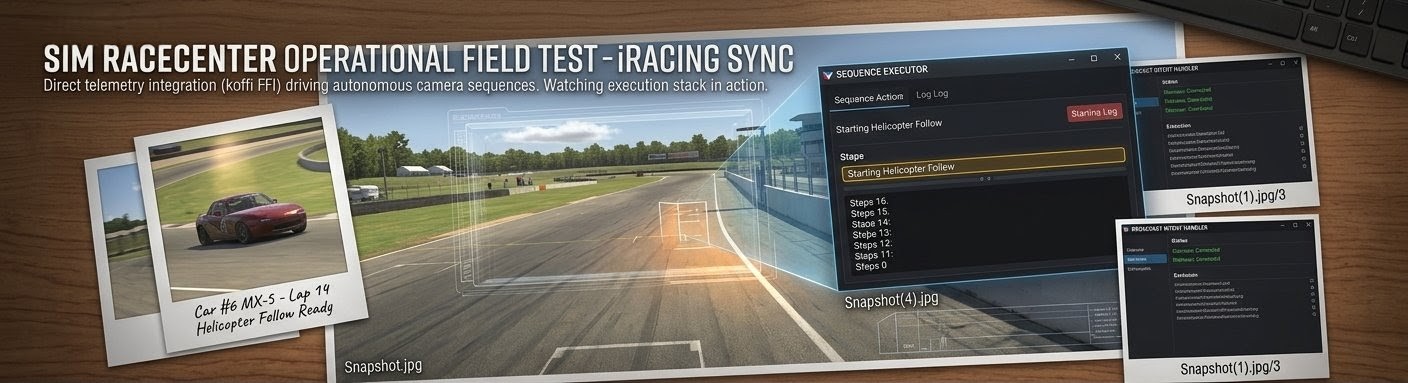 We shipped the Planner–Executor architecture, injected domain knowledge into the AI prompts, added execution history tracking, wired up OBS scene constraints, and resolved the UUID-to-display-name mapping chain. On paper the system was complete. Then we ran live broadcasts — and the gaps became obvious.
This post documents what went wrong during real-world testing, what we fixed to get basics working, and designs the next phase of improvements targeting template selection, timing, and content quality.
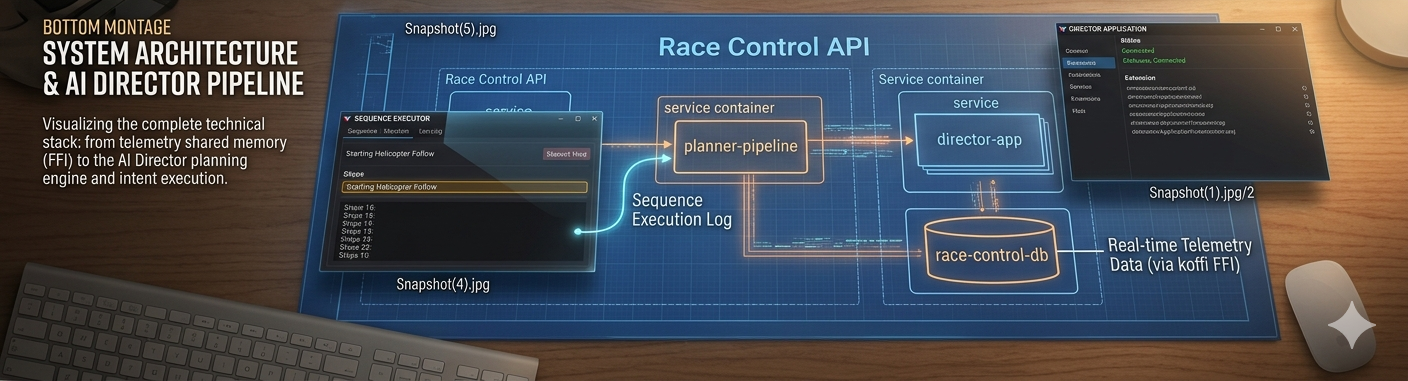
What We Shipped Into Testing
By mid-April 2026 the AI Director pipeline looked like this:
- Check-in — Director app sends capabilities (supported intents, OBS scenes, camera groups, runtime drivers) to Race Control
- Planner (Gemini 3.0 Pro) — generates 20–30 session-scoped sequence templates based on static session config, operator library examples, and domain knowledge blog posts
- Context Cache — static prompt prefix (templates + knowledge + guidelines) stored in Gemini's server-side cache for fast Executor calls
- Executor (Gemini 2.5 Flash) — on every
/sequences/nextpoll (~10–30s), selects the best template for the current race state and fills variables from live telemetry - Director App — executes the fully-populated PortableSequence against OBS, iRacing, and comms hardware
Key recent improvements that landed before testing:
| Commit | Change |
|---|---|
| #231 | Inject domain knowledge (blog posts with aiContext: true) into Planner and Executor prompts |
| #232 | Add execution history to Executor prompt for broadcast variety |
| #235 | Add scenes and drivers to DirectorCapabilities; inject scene constraints into templates |
| #236 | Resolve UUID scene IDs to OBS display names throughout the config pipeline |
We also updated the OpenAPI spec to accept scenes: string[] and drivers: CapabilityDriver[] on the check-in payload, giving the Planner visibility into the Director's actual OBS scene list and simulator driver roster.
Phase 1: Context Gaps — Templates Built on Incomplete Data
The first thing that broke was template accuracy. The Planner was generating templates that referenced scenes, drivers, and camera groups that didn't exist on the actual broadcast rig. The root cause: the Planner was building templates from incomplete context.
Scene Names
The Center entity stores OBS scenes with UUID keys and human-readable display names. Session creation saved only the UUID. But OBS WebSocket v5 needs display names for SetCurrentProgramScene. The Planner was receiving UUIDs like a3f7b2c1-... instead of "Race_Director" — and the model was inventing plausible scene names that didn't match any real OBS scene.
Fix: buildSessionOperationalConfig() now accepts a sceneMap (UUID → displayName) built from Center.obsScenes. All three callers — check-in, capabilities refresh, and sequence polling — fetch the Center and pass the map. Templates now contain valid OBS scene names.
Driver Mapping
The Planner knew about configured drivers from the session, but not drivers discovered at runtime by the simulator. A 30-car field where only 3 are "our" SimRaceCenter drivers meant the Planner had no knowledge of the other 27 car numbers. Templates targeting ${targetDriver} with applicability like "when battling a field car" had no way to validate that the Executor would pick a real car number — and sometimes the Executor would pick car indices instead of car numbers (the carNumber vs carIdx bug fixed in #220).
Fix: DirectorCapabilities now include a drivers array with carNumber, userName, and carName from the simulator's session YAML. The Planner prompt includes the full field roster, not just configured team drivers.
Camera Groups
iRacing camera groups are identified by numeric groupNum internally but referred to by name in broadcast parlance (TV1, TV2, Chase, Blimp, Scenic, Pit Lane). The cameraGroups field on DirectorCapabilities bridges this — but early templates used string names while the broadcast.showLiveCam intent expected numeric IDs.
Fix: Camera group name-to-number resolution (#219) and the Planner prompt now includes both the name and groupNum so templates can reference either.
The Context Fixes Worked — But Exposed Deeper Problems
With accurate scene names, driver data, and camera group mappings, the templates were valid. They referenced real OBS scenes, real car numbers, and real camera groups. The Director could execute them without runtime errors.
But watching the live broadcast, the output was mediocre. The camera would switch correctly, the OBS scene would change, but the broadcast storytelling was poor. Three categories of problems emerged:
Problem 1: Template Selection — The Wrong Template at the Wrong Time
The Executor chooses from the Planner's template library based on the current race state. But the Planner generates templates at check-in time from static session config — it doesn't know what will happen during the race. This creates a mismatch:
Observed issues:
- Too many battle templates, not enough variety. The Planner generates 6–8 battle variations out of 20–25 total templates. During a processional stint with no close racing, the Executor had almost nothing appropriate to select and would fall back to "field coverage" repeatedly.
- No templates for common race phases. No specific templates for the opening laps after a restart (different from a race start), mid-stint rhythm coverage, or the final 5-lap push to the finish. The Planner thinks in categories (battle, solo, incident) but a real broadcast director thinks in race phases.
- Applicability strings are too vague. A template with
"applicability": "Two drivers within 2 seconds of each other"doesn't distinguish between a closing battle, a stable follow, and a driver falling back. The Executor treats them all the same.
Design direction: The Planner needs to understand race narrative phases — green-flag running, opening laps, pit cycle, closing laps, final stint — and generate targeted templates for each. The Executor needs structured applicability scoring, not just a prose description.
Problem 2: Timing — Sequences That Feel Robotic
Every template uses ${durationMs} as a per-step camera hold time, resolved by the Executor. The Executor tends to pick a single value (e.g., 8000ms) and apply it uniformly to every step. The result: every camera angle holds for exactly 8 seconds, creating a metronomic rhythm that no human director would produce.
Observed issues:
- Uniform hold times. All
system.waitsteps in a sequence get the samedurationMs. A battle sequence should hold the wide shot longer when cars are side-by-side, cut quickly to an onboard for a pass attempt, then hold the reaction shot briefly. Instead it's 8s-8s-8s-8s. - Total duration mismatches. The Planner specifies a
durationRange(e.g., 20,000–35,000ms) but the Executor sometimes overlooks it. Templates with 6 steps at 8,000ms each run 48 seconds — well outside the range. - No pacing variation by race context. During a caution period, camera holds should be longer and more relaxed. During a final-lap battle, cuts should be fast and punchy. The system has no concept of pacing.
Design direction: Templates should specify per-step timing hints — "hold 3–5s", "hold 8–12s", "quick cut 1–2s" — rather than a single ${durationMs} variable. The Executor should vary timing based on race intensity: slow pacing for cruising, fast cuts for action.
Problem 3: Content Quality — Technically Correct But Editorially Flat
The sequences execute valid intents — cameras switch, scenes change, even TTS announcements fire. But the editorial quality doesn't match a human broadcast director.
Observed issues:
- No narrative arc within a sequence. A battle sequence should build tension: establish → approach → action → reaction. Current templates switch cameras without a storytelling framework.
- OBS scene switching feels random. Sequences switch between onboard scenes and the Race Director scene, but without a clear editorial reason. A human director switches to an onboard when they want the viewer to feel what the driver feels; the AI switches because the template says to.
- TTS announcements are generic. The
communication.announcesteps get bland payloads like"Battle for position 5"instead of contextual content that references the specific drivers and what makes this moment interesting. - Missing establisher patterns. Professional broadcasts start sequences with a wide or scenic establishing shot before cutting to action. The templates jump straight into close-up coverage.
Design direction: Templates need structured narrative metadata — a narrativeArc field that tells the Executor the editorial purpose of each step (establish, build, climax, resolve). TTS payloads need to be generated from richer context about why this moment matters.
Designing the Fix: Five Layers of Improvement
Based on testing, we're designing five targeted improvements: two new context features that feed the AI better information, and three structural improvements to how templates are generated and executed.
Feature 1: Race Director's Notes — Center-Specific Broadcast Intelligence
The biggest gap in template quality isn't structural — it's editorial context. The Planner knows what OBS scenes exist and which drivers are configured. But it has zero knowledge of how this specific broadcast center wants to use them.
Consider: a center has an OBS scene called "Driver_1_Onboard" and another called "Race_Director". The Planner knows these are valid scene values. But it doesn't know:
- When should the director prefer onboard scenes vs. the Race Director feed?
- Does this center use picture-in-picture overlays? When are they appropriate?
- Are there special lighting presets or overlay triggers tied to race events?
- What's the center's preferred pacing style — fast cuts like F1 coverage or longer holds like NASCAR?
- Which camera groups work best on which tracks at this center's FOV settings?
- Are there "signature shots" — like a Blimp opening on every restart, or always showing the leader's onboard crossing the finish line?
This knowledge lives entirely in the operator's head today. They encode some of it in operator sequences (uploaded at check-in), but that only covers a handful of patterns. The Planner fills the rest with generic broadcast heuristics from the domain knowledge base.
Proposed: Race Director's Notes — a free-text field on the Center entity where the operator writes broadcast direction guidance that gets injected directly into the Planner and Executor prompts.
Data Model
Add a directorNotes field to the Center entity:
export interface Center {
  // ...existing fields...
  directorNotes?: string;  // Markdown-formatted broadcast direction notes
}
This is intentionally unstructured. Operators think in natural language about their broadcast style, not in JSON schemas. Examples of what an operator might write:
## Scene Usage

- **Race_Director**: Our primary scene. Use for all iRacing camera work.
  The sim camera is controlled via broadcast.showLiveCam while this scene is active.
- **Driver_1_Onboard** / **Driver_2_Onboard**: Direct driver POV feeds.
  Best used for 10-15 second cuts during battles or solo features.
  NEVER switch to a driver's onboard scene while they're in the pits — the view is static and boring.
- **Standings_Overlay**: Use sparingly — once every 3-4 minutes during green flag.
  Always transition BACK to Race_Director after, never to an onboard.

## Pacing Preferences

- We run a casual broadcast style. Longer holds (8-12s) feel better than quick cuts.
- During cautions, hold Race_Director on the Blimp camera for at least 15 seconds.
- On restarts, always start with a wide Chase cam shot before cutting to onboards.

## Lighting & Effects

- We trigger OBS scene transitions using the "Stinger_Racing" transition.
  The Director app handles this — but sequences should allow 800ms between scene switches
  for the transition animation to complete.
- Our "Race_Start" scene has a countdown overlay that auto-hides after 5 seconds.
  Use this scene for the first step of any race-start template.

## Track-Specific Notes

- **Watkins Glen**: The Blimp camera (group 5) shows the entire esses section. Great establishing shot.
- **Daytona**: Pit Lane camera is on the backstretch, not pit road. Use Chase cam for pit entry coverage.
Prompt Injection
The Planner prompt gains a new section between session config and template categories:
## RACE DIRECTOR'S NOTES (from this center's operator)
${center.directorNotes}

These notes reflect how this specific broadcast center prefers to direct.
Apply these preferences when generating templates — they override generic broadcast guidelines.
The Executor prompt also receives the notes (via the static prefix / context cache), so it applies the operator's scene usage preferences when filling variables. If the notes say "never switch to an onboard while pitting," the Executor respects that even if a template's variables would allow it.
API Surface
Center CRUD already exists. The directorNotes field is added to the Center schema in the OpenAPI spec and the update endpoint. The Race Control UI gets a notes editor — a simple textarea with Markdown preview — on the Center settings page.
No changes to the check-in flow. The Planner already fetches the Center entity to resolve scene UUIDs. We piggyback on that fetch to pull directorNotes.
Feature 2: Race Session Summary — Setting the Scene for the AI
The Planner generates templates from static session config: driver names, car numbers, OBS scenes, track name, series. This is the mechanical context. What's missing is the narrative context — the story of this specific race session.
Consider a real-world example. This YouTube broadcast features a lighthearted, competitive iRacing session at Zandvoort framed as a "mini Grand Prix" between two creators. The husband, racing as Team Lando in a McLaren livery, and his wife Jackie, racing as Team Max in a Red Bull livery, attempt to navigate the notoriously difficult banked corners of the track. Throughout the race, the duo experiences comedic crashes, spin-outs, and technical challenges with the high-downforce car setup.
How was the broadcast produced?
- Split-screen / perspective switching: The creators switch between individual onboard cameras to show each driver's perspective during the race. This allows viewers to see each driver's struggle with the track independently.
- Real-time communication: They race in the same virtual session, commenting on proximity, joking about mistakes, and narrating the rivalry as it unfolds.
- Team dynamics: The "rivalry" is a fun, bonding experience — even when they crash into each other or get physically stuck together due to the game's physics.
A human broadcast director for this session would know all of this before the green flag. They'd know to lean heavily into the split-screen onboard cuts when the two drivers are near each other. They'd know this is a lighthearted session where comedic moments deserve camera time, not just competitive battles. They'd know the Zandvoort banked corners are the highlight — so the Blimp camera over Turn 3 is the go-to establishing shot.
Our AI Director knows none of this. It receives "Practice session, Zandvoort, 2 configured drivers" and generates generic battle/solo/scenic templates indistinguishable from any other 2-driver session at any other track.
Proposed: Race Session Summary
A summary field on the RaceSession entity where the operator (or an AI pre-processor) writes the narrative context for this specific broadcast:
export interface RaceSession {
  // ...existing fields...
  summary?: string;  // Narrative description of this session's broadcast context
}
Example summary for the Zandvoort session:
## Session Narrative

Lighthearted "mini Grand Prix" rivalry between two creators — husband (Team Lando,
McLaren livery, car #4) vs wife Jackie (Team Max, Red Bull livery, car #33).
This is entertainment-first content, not competitive racing.

## Broadcast Priorities

1. **Driver rivalry moments**: Any time cars #4 and #33 are within 5 seconds of each other,
   treat it as a highlight moment. Switch between both onboards frequently.
2. **Comedic crashes and spin-outs**: These are content gold. When either driver
   goes off-track, hold the onboard camera for the reaction — don't cut away quickly.
3. **Track challenge moments**: The banked corners at Turns 3 and 10 are
   particularly challenging. Use the Blimp/scenic camera when either driver
   approaches these sections.
4. **Communication-forward**: The drivers are talking to each other throughout.
   TTS announcements should be minimal and playful in tone — "Jackie's closing in!"
   not "Car 33 has closed the gap to 1.2 seconds."

## Tone

Casual, fun, couple's-gaming energy. This isn't a championship race broadcast.
Don't use formal race commentary language. Quick cuts, lots of driver onboard time,
and camera moments that capture the chaos.
How It Flows Through the Pipeline
The session summary injects at two points:
1. Planner prompt — Between the session config and template categories:
## SESSION SUMMARY (operator briefing for this specific broadcast)
${session.summary}

Use this summary to guide template design. Match the tone, priorities, and
broadcast style described. Generate templates that serve THIS session's narrative,
not generic race coverage.
This changes what the Planner generates. For the Zandvoort casual session, it would produce:
- Rivalry spotlight templates (both drivers on screen with quick cuts) instead of generic battle templates
- Comedy moment templates (hold onboard camera, slow pacing) instead of incident templates
- Track challenge templates using Blimp at specific corners instead of generic scenic templates
- Fewer or no "formal race coverage" templates (standings overlays, strategy analysis)
2. Executor prompt — In the dynamic suffix alongside race context:
## SESSION BRIEFING
${session.summary}

Consider this briefing when selecting templates and filling variables.
The summary describes what matters for THIS broadcast.
This changes how the Executor picks templates. During a rhythm stint, instead of defaulting to generic "field coverage," it might pick the "rivalry spotlight" template if both configured drivers are on track — because the session summary says that's the most important camera moment.
Creating Session Summaries
Three approaches, from simple to sophisticated:
-
Manual entry — Operator writes the summary in the Race Control UI when creating the session. Best for planned events where the operator knows the storyline.
-
AI-assisted generation — The operator provides a few bullet points ("casual rivalry between husband and wife, McLaren vs Red Bull"), and an AI pre-processor expands it into a structured summary with broadcast priorities and tone guidance.
-
Linked content ingestion — The operator pastes a YouTube URL or a text description from a race league's event page. An AI summarizer extracts the narrative context and generates the session summary. This is particularly powerful for leagues that publish event previews or driver bios.
For v1 we implement manual entry. The Race Control UI session-creation form gets a summary textarea. The field is optional — sessions without a summary get generic template generation, same as today.
Layers 1–3: Structural Template Improvements
With Director's Notes and Session Summaries providing richer context, the structural improvements become more effective — the Planner and Executor have the editorial intelligence to use them well.
Layer 1: Race-Phase-Aware Template Categories
Replace the current flat category list with race-phase-aware categories:
TEMPLATE CATEGORIES by race phase:

PRE-GREEN (grid, pace laps):
  - Grid walk: cycle through team driver onboards with intro TTS
  - Field overview: Race Director wide shots of the forming grid

GREEN FLAG — OPENING (laps 1–3):
  - Race start: wide shot → battle cuts → settle-in
  - Restart: similar but assumes mid-race context
  - First-lap incident: fast reaction coverage

GREEN FLAG — RHYTHM (mid-stint, no action):
  - Solo driver feature: extended onboard + stats TTS
  - Field position recap: Race Director sweep of running order
  - Scenic interlude: Blimp/scenic cameras with ambient coverage

GREEN FLAG — ACTION (battles, passes):
  - Closing battle: approach → side-by-side → resolution
  - Completed pass: reaction shots from both drivers
  - Multi-car battle: rotating coverage of 3+ cars

PIT CYCLE:
  - Pit entry: follow driver from track to pit lane
  - Pit stop: pit lane camera → overlay with stop time
  - Undercut/overcut narrative: show the strategy playing out

CAUTION:
  - Incident replay: replay → affected driver onboard for reaction
  - Field under caution: relaxed pacing, standings overlay
  - Restart preparation: grid reform → driver onboards for tension

CLOSING (final 5 laps or 5 minutes):
  - Championship battle: fastest cuts, shortest holds
  - Final lap: dramatic pacing with audio buildup
  - Victory: winner's onboard → celebration sequence
The Planner would receive the session type, total laps/time, and caution rules — then generate templates for the phases that apply. A 15-lap sprint race might skip the "rhythm" phase entirely. A 2-hour endurance race would get more pit cycle and rhythm templates than battle templates.
Layer 2: Per-Step Timing Hints
Replace the single ${durationMs} variable with per-step timing annotations in the template:
interface SequenceStep {
  id: string;
  intent: string;
  payload: object;
  metadata: {
    label?: string;
    narrativePurpose?: 'establish' | 'build' | 'action' | 'reaction' | 'resolve';
    holdHint?: {
      minMs: number;
      maxMs: number;
      paceModifier?: 'stretch-on-caution' | 'compress-on-action';
    };
  };
}
The Planner bakes timing ranges into each step. The Executor resolves the actual durationMs per step based on:
- The step's
holdHintrange - The current race intensity (derived from flags, battle proximity, lap count)
- The total sequence duration target (sum must fall within template's durationRange)
This eliminates the "metronomic 8 seconds" problem. An establishing wide shot might get 10–15s. A quick onboard cut during a pass might get 2–3s. A reaction shot holds for 4–6s.
Layer 3: Narrative Structure and TTS Context
Add narrative metadata to templates that the Executor uses for editorial decisions:
interface SequenceTemplate {
  // ...existing fields...
  narrative: {
    arc: 'tension-release' | 'discovery' | 'recap' | 'celebration';
    opensWith: 'establish-wide' | 'driver-onboard' | 'replay';
    buildStrategy: string;  // natural language hint for the Executor
    ttsGuidance?: string;   // what the announcer should talk about
  };
}
Example for a battle template:
{
  "narrative": {
    "arc": "tension-release",
    "opensWith": "establish-wide",
    "buildStrategy": "Start with Race Director wide showing the gap closing, cut to leading driver's onboard as the trailing car fills the mirror, then quick cut to the attacker's onboard for the approach. If a pass happens, hold on the new leader for the reaction.",
    "ttsGuidance": "Call out the two drivers by name and position. Mention the gap in seconds. If this is for a top-5 position, emphasize the stakes."
  }
}
The Executor would use ttsGuidance to generate the actual communication.announce payload with real driver names, positions, and context from the live leaderboard — instead of generic text.
Applicability Scoring: From Prose to Structure
Currently, template applicability is a prose string: "Two drivers within 2 seconds of each other". The Executor interprets this through the language model, which is inconsistent.
We want to move toward structured applicability conditions:
interface TemplateApplicability {
  description: string;           // human-readable (for logs/UI)
  conditions: {
    racePhase?: ('opening' | 'rhythm' | 'action' | 'pit-cycle' | 'caution' | 'closing')[];
    requiresBattle?: boolean;
    requiresPitting?: boolean;
    requiresFlag?: ('green' | 'caution' | 'white' | 'checkered')[];
    minCarsOnTrack?: number;
    teamDriverRequired?: boolean;    // at least one team driver on track
    lapsRemainingMax?: number;       // for closing-phase templates
    lapsRemainingMin?: number;       // for mid-race templates
  };
  score?: number;                // Planner-assigned priority weight
}
The Executor can pre-filter templates by conditions before invoking the language model. If no battle is detected, all requiresBattle: true templates are excluded from the candidate set. This reduces the model's decision space and prevents misselection.
The conditions don't replace the model's judgment — they narrow the candidate pool so the model chooses between contextually appropriate options instead of the entire library.
Implementation Approach
This is a multi-phase rollout, ordered by impact and dependency:
Phase 1: Race Director's Notes (Center Entity + Prompt Injection)
Add directorNotes to the Center type and Cosmos DB schema. Fetch it in director-checkin.ts alongside the existing Center lookup. Inject into buildPlannerPrompt() and buildStaticPromptPrefix(). Add a notes editor to the Center settings page in the UI. Update the OpenAPI spec with the new field.
Dependency: None. Can ship independently.
Phase 2: Race Session Summary (Session Entity + Prompt Injection)
Add summary to the RaceSession type. Add a textarea to the session creation form. Inject into both Planner and Executor prompts. Update the OpenAPI spec.
Dependency: None. Can ship independently, in parallel with Phase 1.
Phase 3: Race Phase Detection (Executor-Side)
Add a deriveRacePhase() function that maps the incoming RaceContext to a phase:
function deriveRacePhase(ctx: RaceContext): RacePhase {
  if (ctx.sessionFlags & FLAGS.CAUTION) return 'caution';
  if (ctx.lapsRemain <= 5 || ctx.timeRemainSec <= 300) return 'closing';
  if (ctx.leaderLap <= 3) return 'opening';
  if (ctx.pitting.length > 0 && isPitWindow(ctx)) return 'pit-cycle';
  if (ctx.battles.length > 0) return 'action';
  return 'rhythm';
}
Dependency: None. Can ship independently.
Phase 4: Enhanced Planner Categories
Update buildPlannerPrompt() to request phase-aware categories instead of flat categories. Templates include the new narrative and applicability structures. This is a prompt-only change — no type system impact because templates are generated as JSON.
Phase 5: Per-Step Timing in Templates
Add holdHint to step metadata and update the Executor prompt to resolve per-step timing. Add validation in sanitizeSequence() to ensure total duration stays within the template's range.
Phase 6: Structured Applicability Filtering
Parse applicability conditions from templates. Add pre-filtering before the Executor model call. Track filter metrics (how many templates survive filtering per poll) for tuning.
What This Means for the Domain Knowledge Pipeline
These improvements feed back into the AI context system. This blog post will be ingested as domain knowledge (via aiContext: true frontmatter) — meaning the Planner and Executor will have awareness of these design principles as they generate and evaluate templates.
The race-phase concept, narrative arc patterns, and timing variation principles become part of the AI's broadcast knowledge, even before the code changes are fully implemented. This is intentional — the domain knowledge pipeline is one of our most effective levers for improving output quality without touching code.
Measuring Success
We'll evaluate these changes against the same live broadcast scenarios that exposed the current gaps:
| Metric | Current | Target |
|---|---|---|
| Template category diversity per session | 4–5 categories used out of 9 | 7+ categories, phase-appropriate |
| Consecutive same-category sequences | 3–4 in a row during rhythm stints | Max 2, then forced rotation |
| Per-step timing variance (std dev) | ~200ms (nearly uniform) | >2000ms (natural variation) |
| TTS content references specific drivers | ~30% of announcements | >80% |
| Sequence narrative arc completeness | No arc structure | Establish → build → resolve present in >60% of sequences |
| 204 rate during active racing | ~15% (no suitable template) | <5% |
These metrics can be computed from execution history records and template metadata without manual observation.
Summary
Live testing validated the pipeline architecture — the Planner–Executor split, domain knowledge injection, check-in lifecycle, and PortableSequence format all work as designed. The infrastructure is solid.
What's missing is editorial intelligence: knowing when to show what for how long in the context of a race that's unfolding in real time. We're addressing this with five improvements:
- Race Director's Notes — center-specific broadcast guidance injected into AI prompts so the Planner generates templates that match the operator's style, scene usage, and hardware setup
- Race Session Summary — per-session narrative context that tells the AI what this broadcast is about, not just what drivers and scenes are available
- Race-phase-aware categories — templates designed for specific race phases (opening, rhythm, action, pit cycle, closing) instead of flat categories
- Per-step timing hints — variable hold times per step so sequences feel natural instead of metronomic
- Structured applicability filtering — condition-based pre-filtering so the Executor picks from contextually appropriate templates
The first two features are the highest-impact changes — they transform the Planner from a generic template factory into a context-aware broadcast designer that understands both the center's style and the session's story. The last three are structural improvements that make better use of that richer context.
The code changes are incremental — new fields on existing entities, prompt modifications, and template metadata enrichment. No architectural rewrites. The Planner–Executor contract remains the same. The PortableSequence format gains optional metadata but stays backward-compatible.
The hardest part isn't the code. It's teaching the AI what a good broadcast feels like.